Reference Centre
Return to the Industrial Modem Application Notes
Overview
This application note explains how to securely access a remote cellular modem using a private fixed IP SIM, a private APN and a VPN connection. It describes both inbound and outbound socket architectures, allowing devices to be accessed securely across private mobile networks without exposing equipment directly to the public internet.
¶ Applicable Products
| Product | Description |
|---|---|
| ZETA-GEP-LTE4 (EU) | Industrial LTE Cat 4 Modem with GNSS |
| ZETA-NEP-LTE4 (EU) | Industrial LTE Cat 4 Modem |
| ZETA-NSP-LTE1 (EU) | Industrial LTE Cat 1 Modem |
| ZETA-NLP-LTE1 (EU) | Industrial Ultra Low Power LTE Cat 1 Modem |
| ZETA-NLP-LTEM (EU) | Industrial Ultra Low Power LTE-M / NB-IoT Modem |
¶ Objectives
This guide explains how to:
- Use a SIM with a private fixed IP address
- Connect a modem to a private APN
- Establish a VPN connection into the APN provider network
- Configure a modem to listen for incoming socket connections
- Access a remote device securely using its fixed IP address
- Configure a modem to initiate an outbound socket connection
- Understand the advantages and limitations of each architecture
Expected Result
At the end of this guide a remote modem should be securely reachable using either inbound socket access or an outbound socket connection routed through a VPN connected private APN.
¶ Understanding Secure Private Mobile Networks
Traditional cellular devices typically operate using public internet connectivity.
In this configuration:
Device
   │
Mobile Network
   │
Public Internet
   │
Application
While simple to deploy, this approach introduces several challenges:
- Public IP addressing
- Firewall traversal
- Dynamic IP assignment
- Increased attack surface
- Additional security requirements
Many industrial applications require a more secure architecture.
Examples include:
- Remote telemetry
- SCADA systems
- Industrial automation
- Utility monitoring
- Environmental monitoring
- Critical infrastructure
For these applications a private APN and VPN architecture is often preferred.
¶ What is a Private APN?
APN stands for:
Access Point Name
The APN defines how the SIM card connects into the mobile operator network.
Most consumer SIM cards connect to a public APN.
Examples include:
internet
everywhere
mobile.o2.co.uk
three.co.uk
A private APN behaves differently.
Instead of connecting devices directly to the public internet, the traffic is routed into a dedicated private network.
¶ Private APN Architecture
Remote Device
      │
Private APN
      │
Provider Core Network
      │
VPN Tunnel
      │
Customer Network
¶ Figure 1 – Private APN Architecture
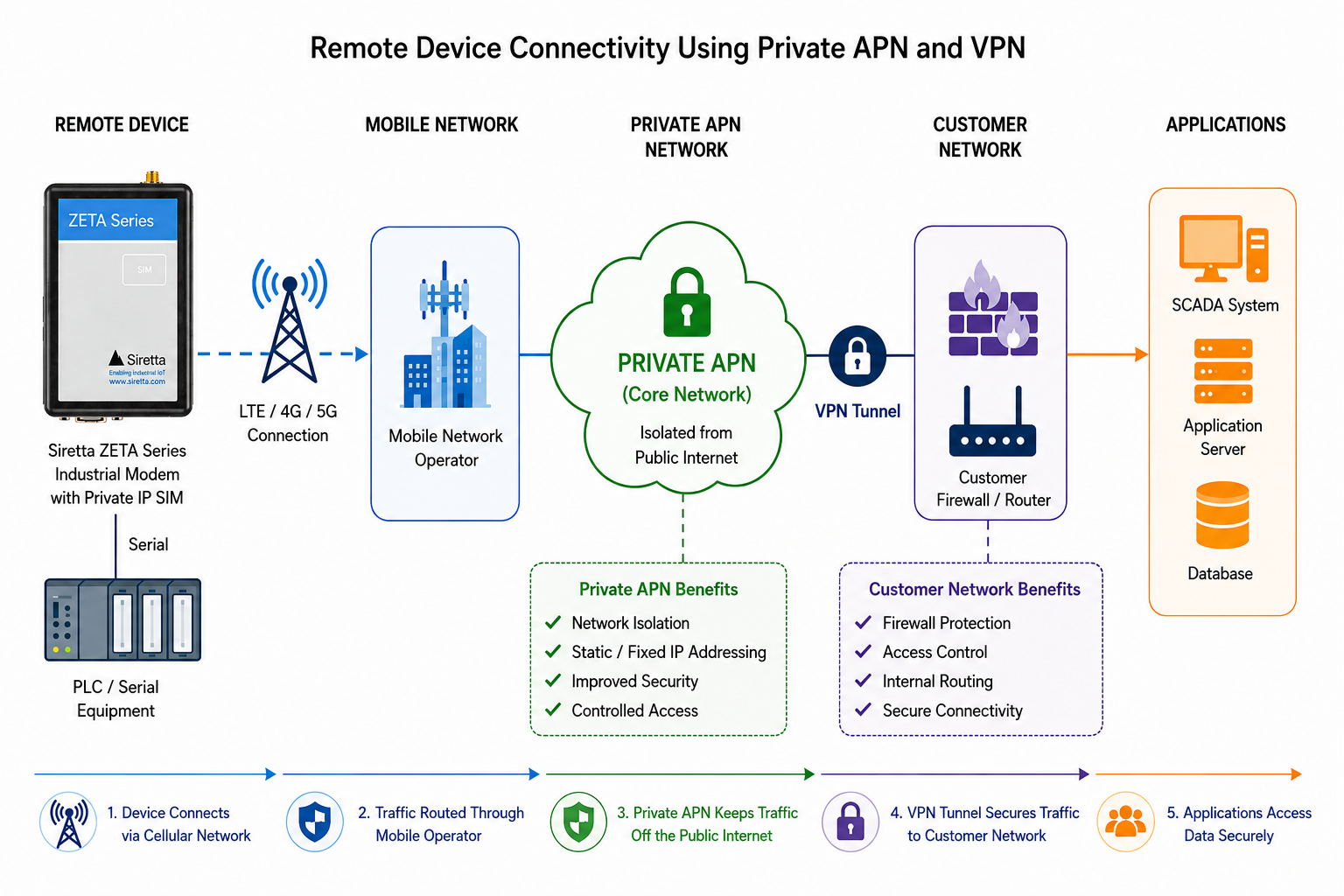
In this arrangement:
- Devices are isolated from the public internet
- Communication occurs only within the private network
- Access is controlled through VPN connectivity
- Security policies can be centrally managed
Important Note
A private APN does not automatically provide encryption. Traffic isolation and traffic encryption are separate concepts.
¶ Understanding Fixed IP SIM Cards
Many private APN services provide fixed IP addressing.
Unlike a standard SIM, which may receive a different address each time it connects, a fixed IP SIM is allocated the same IP address every time a PDP context is established.
For example:
10.10.10.50
may always be assigned to a particular SIM card.
This provides several advantages:
- Predictable addressing
- Easier firewall management
- Simplified device management
- Simplified routing
- Easier remote access
¶ Example Fixed IP Allocation
| Device | Private IP Address |
|---|---|
| Pump Station 1 | 10.10.10.50 |
| Pump Station 2 | 10.10.10.51 |
| Pump Station 3 | 10.10.10.52 |
Because the addresses never change, remote systems can always connect to the same endpoint.
¶ Understanding VPN Connectivity
A VPN provides secure connectivity between the customer network and the APN provider network.
Typical VPN technologies include:
- IPSec
- OpenVPN
- WireGuard
- MPLS-based VPN services
The VPN creates an encrypted tunnel between:
Customer Network
        │
Encrypted VPN Tunnel
        │
Private APN Network
¶ Figure 2 – VPN Connectivity Architecture
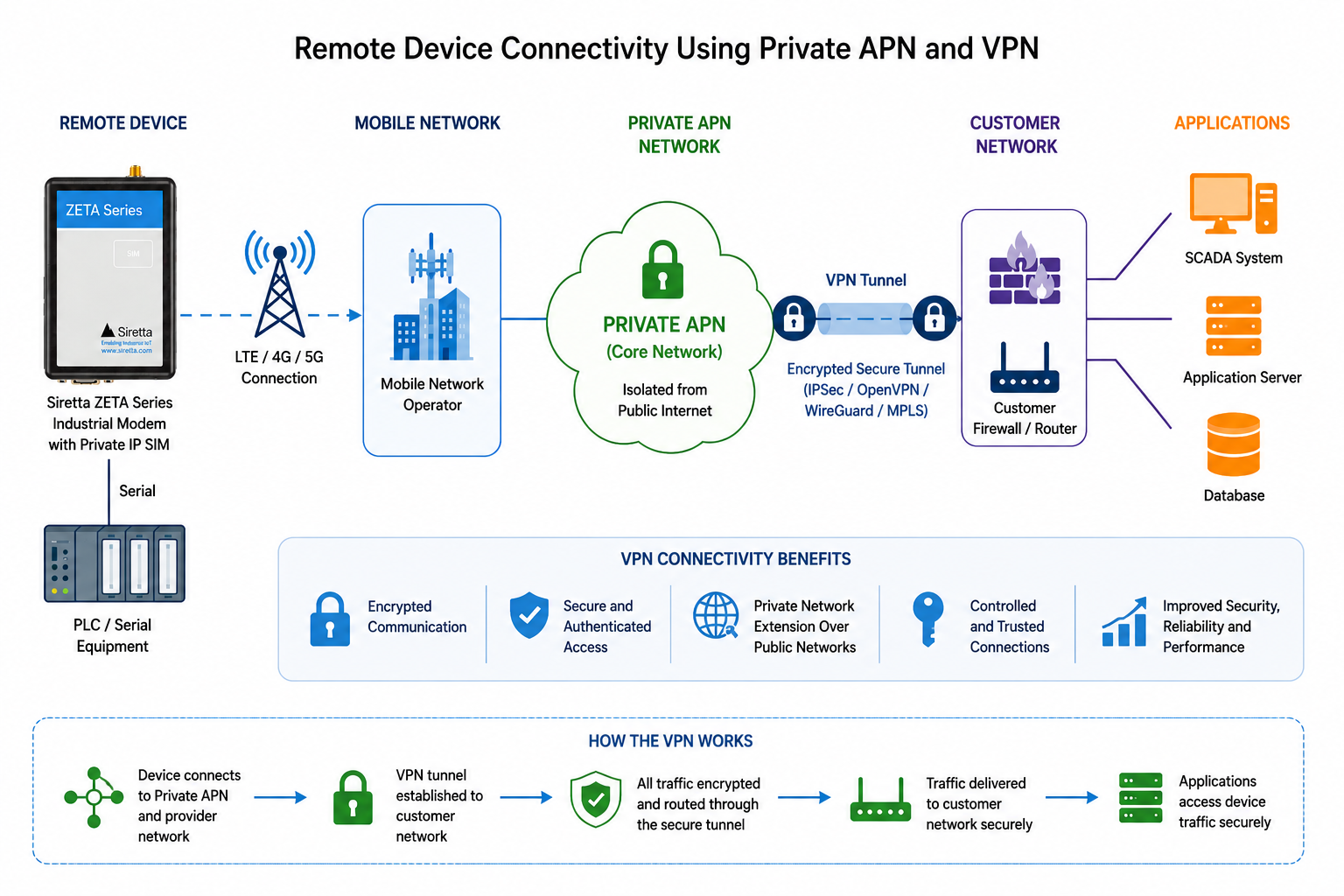
The VPN provides:
- Encryption
- Authentication
- Controlled access
- Traffic isolation
This means that device traffic remains protected while traversing intermediate networks.
¶ Two Common Connectivity Architectures
There are two common methods used to exchange data with remote cellular devices.
¶ Method 1 – Inbound Socket Access
The modem listens for incoming socket connections.
The client connects to the VPN and then directly accesses the modem using its fixed IP address.
Client
   │
VPN
   │
Private APN
   │
Fixed IP Device
Advantages:
- Simple architecture
- Direct device access
- No intermediary server required
¶ Method 2 – Outbound Socket Connection
The modem initiates the socket connection.
Device
   │
Private APN
   │
VPN
   │
Server
   │
Client Application
Advantages:
- No inbound connections required
- Easier firewall implementation
- Works in environments where inbound sessions are restricted
¶ Choosing the Correct Architecture
| Requirement | Recommended Method |
|---|---|
| Direct device access | Inbound Socket Access |
| Centralised data collection | Outbound Socket Connection |
| SCADA systems | Inbound Socket Access |
| Cloud data aggregation | Outbound Socket Connection |
| Many remote devices | Outbound Socket Connection |
¶ Required Resources
Before configuring secure remote access, ensure the following resources are available.
| Item | Description |
|---|---|
| Cellular Modem | Industrial Siretta ZETA modem |
| Private Fixed IP SIM | SIM provisioned with a fixed private IP address |
| Private APN Service | Dedicated APN configured by the SIM provider |
| VPN Service | VPN connection into the APN provider network |
| Client Device | PC, PLC, SCADA system or application server |
| SIM Provider Details | APN name, username and password |
¶ SIM and APN Requirements
Before configuration begins, the SIM provider should supply the following information.
| Parameter | Example |
|---|---|
| APN Name | private.apn.company |
| Username | customer001 |
| Password | ******** |
| Fixed IP Address | 10.10.10.50 |
| VPN Address Range | 10.10.0.0/16 |
| VPN Endpoint | Provider supplied |
Important Note
Not all fixed IP SIM services support inbound connectivity. Confirm with the SIM provider that inbound routing is enabled if direct socket access to the modem is required.
¶ Modem Configuration
The following examples use standard Siretta ZETA socket commands.
Command support may vary between modem familiesand supported technologies.
Refer to the modem AT command reference guide for device-specific syntax.
¶ Verify Network Registration
Before establishing a packet data session, confirm that the modem has successfully registered with the mobile network.
AT+CREG?
Example response:
+CREG: 0,1
or
+CREG: 0,5
Where:
| Value | Meaning |
|---|---|
| 1 | Registered on home network |
| 5 | Registered while roaming |
¶ Verify Packet Data Registration
AT+CGREG?
Example response:
+CGREG: 0,1
This confirms packet data services are available.
Expected Result
The modem should report successful registration before packet data activation is attempted.
¶ Configure the PDP Context
The PDP context defines how the modem connects to the private APN.
Example:
AT+CGDCONT=1,"IP","private.apn.company"
Where:
| Parameter | Description |
|---|---|
| 1 | PDP Context Identifier |
| IP | IPv4 PDP Type |
| private.apn.company | Private APN Name |
Example response:
OK
¶ Verify PDP Context Configuration
AT+CGDCONT?
Example response:
+CGDCONT: 1,"IP","private.apn.company"
This confirms the APN configuration has been stored correctly.
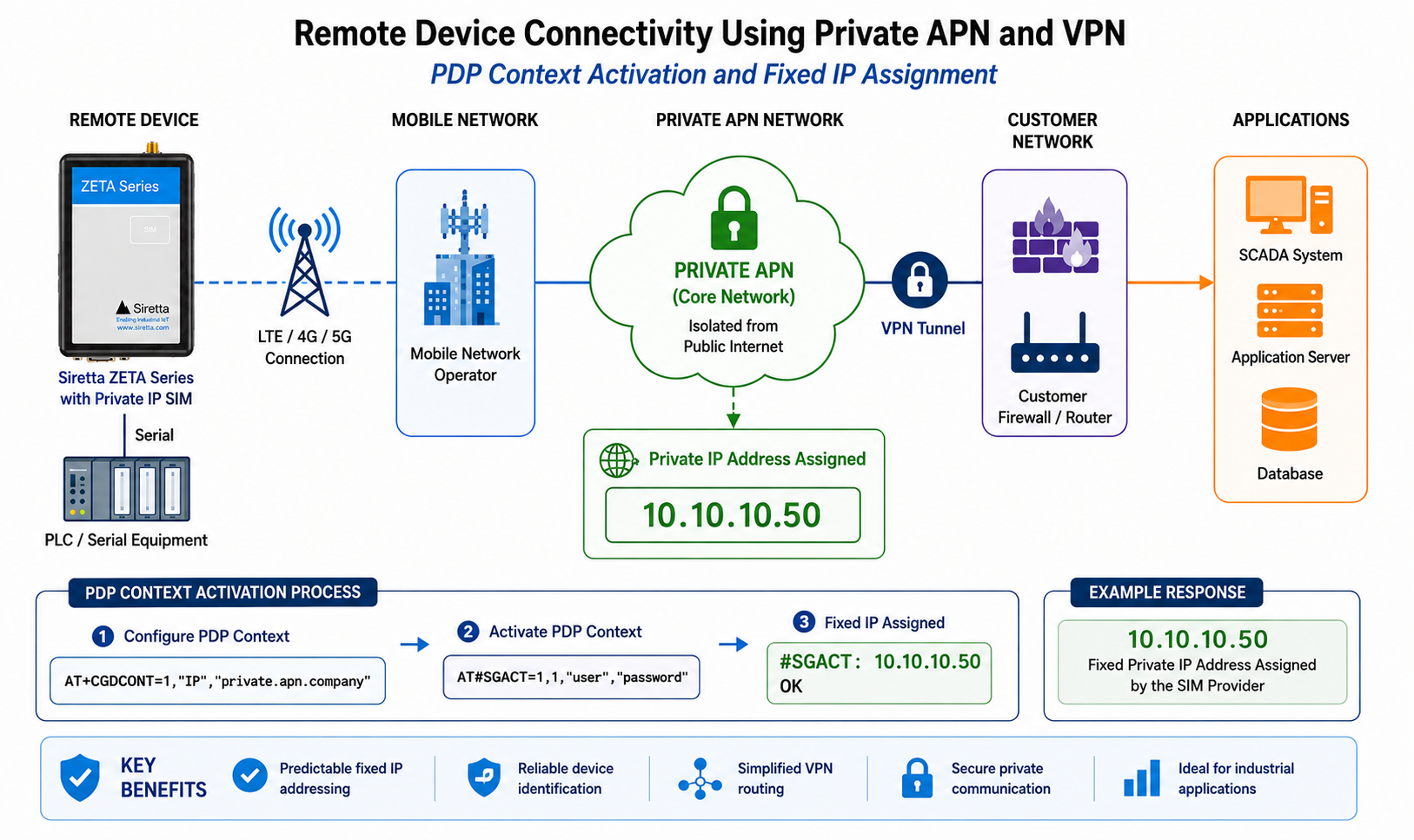
¶ Activate the Packet Data Session
Once the PDP context has been configured, establish the packet data session.
Example:
AT#SGACT=1,1,"customer001","password"
Where:
| Parameter | Description |
|---|---|
| 1 | PDP Context |
| 1 | Activate Context |
| customer001 | Username |
| password | Password |
Example response:
#SGACT: 10.10.10.50

OK
¶ Understanding the Response
The returned address is the IP address assigned to the modem.
Example:
10.10.10.50
This should match the fixed IP address allocated by the SIM provider.
¶ Figure 3 – PDP Context Activation
¶ Verify the Assigned Fixed IP Address
The active context can be queried at any time.
AT#SGACT?
Example response:
#SGACT: 1,1
The response confirms:
- Context exists
- Context is active
- Packet data connectivity is operational
¶ Verify Connectivity
Some providers allow connectivity verification using ICMP ping.
Example:
AT#PING="10.10.0.1"
or
AT#PING="10.10.10.1"
depending on the VPN network design.
Example response:
Reply from 10.10.0.1
Successful responses indicate routing between the modem and provider network is functioning correctly.
Important Note
Some private APN providers block ICMP traffic. Failure to receive a ping response does not necessarily indicate a routing problem.
¶ Understanding Firewall Configuration
Many industrial deployments restrict which remote systems can connect to the modem.
Firewall rules can be used to:
- Permit specific IP addresses
- Block unauthorised access
- Restrict inbound connections
- Improve security
¶ View Existing Firewall Rules
AT#FRWL?
Example response:
#FRWL: ...
The exact output depends on modem configuration.
¶ Example Firewall Rule
Permit all devices within the VPN subnet:
AT#FRWL=1,"10.10.0.0","255.255.0.0"
Permit only a single VPN client:
AT#FRWL=1,"10.10.1.100","255.255.255.255"
This configuration allows the modem to reject unwanted inbound connection attempts.
Security Recommendation
Restrict firewall rules to known VPN-connected systems wherever possible rather than permitting unrestricted access.
¶ Preparing for Socket Communications
Once:
- Network registration is complete
- PDP context is active
- Fixed IP address has been assigned
- Firewall rules are configured
the modem is ready for socket communications.
Two options are available:
¶ Option A
Configure the modem to listen for inbound connections.
Client
   │
VPN
   │
Private APN
   │
Listening Modem
¶ Option B
Configure the modem to establish an outbound connection.
Modem
   │
Private APN
   │
VPN
   │
Server
The following sections describe each approach in detail.
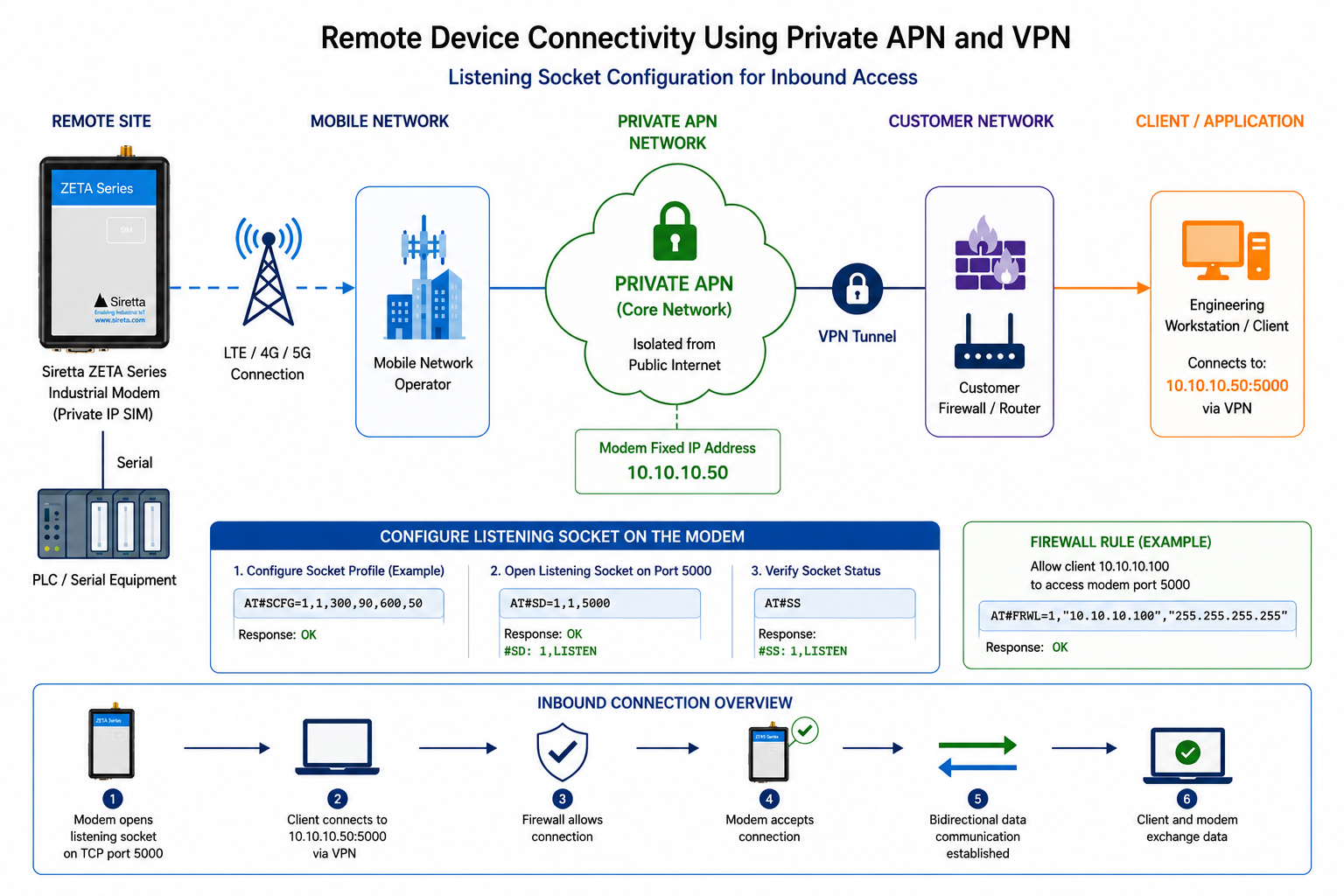
¶ Inbound Socket Architecture
The inbound socket architecture allows a remote client to connect directly to the modem using its fixed private IP address.
This architecture is commonly used for:
- SCADA systems
- PLC communications
- Remote diagnostics
- Industrial control systems
- Telemetry equipment
- Legacy serial device integration
Because the modem has a fixed private IP address, the client always knows where to connect.
¶ Architecture Overview
¶ Figure 4 – Inbound Socket Architecture
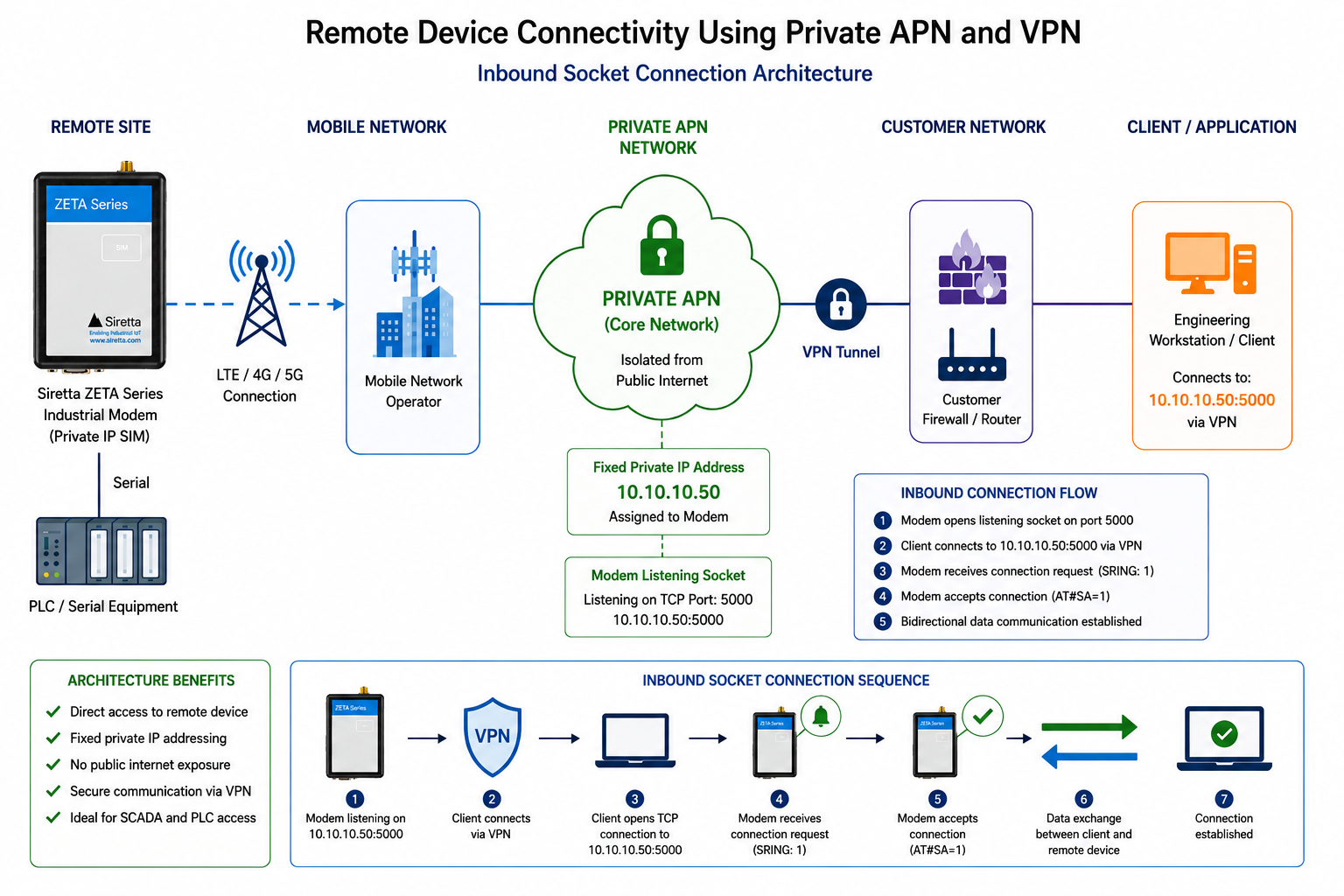
Engineering Workstation
          │
      VPN Tunnel
          │
Private APN Network
          │
  Fixed IP Modem
          │
 Connected Equipment
In this example:
- The workstation establishes a VPN connection
- The workstation gains access to the private APN network
- The modem listens for incoming socket requests
- The workstation connects directly to the modem
¶ Configure Socket Parameters
Before opening a listening socket, configure the socket behaviour.
Example:
AT#SCFG=1,1,300,90,600,50
Where:
| Parameter | Description |
|---|---|
| 1 | Socket Identifier |
| 1 | Command Mode |
| 300 | Packet Timeout |
| 90 | Connection Timeout |
| 600 | Closure Timeout |
| 50 | Packet Size Threshold |
Example response:
OK
Important Note
Socket timeout values should be adjusted to suit the application requirements.
¶ Configure a Listening Socket
The modem must now be configured to listen for inbound connections.
Example:
AT#SL=1,1,5000
Where:
| Parameter | Description |
|---|---|
| 1 | Socket Identifier |
| 1 | TCP Socket |
| 5000 | Listening Port |
Example response:
OK
The modem is now listening for TCP connections on:
10.10.10.50:5000
assuming the assigned fixed IP address is:
10.10.10.50
¶ Verify Listening Socket Status
View socket status:
AT#SS
Example response:
#SS: 1,LISTEN
This confirms the modem is waiting for an incoming connection.
¶ Establishing the Client Connection
The client must first establish its VPN connection.
Once connected to the VPN, the client can open a TCP connection directly to the modem.
Example:
Destination IP:
10.10.10.50

Destination Port:
5000
¶ Typical Connection Sequence
Client
  │
VPN Connect
  │
Private APN Routing
  │
TCP Connect
  │
Modem Listening Socket
¶ Figure 5 – Inbound Connection Sequence
¶ Accepting the Connection
When a connection request arrives, the modem reports:
SRING: 1
This indicates:
Socket 1 has a pending connection request
The connection can now be accepted.
AT#SA=1
Example response:
CONNECT
The socket is now active.
¶ Data Transmission
Once connected, data can be exchanged between:
- Client
- Modem
- Connected equipment
¶ Figure 6 – Active Data Session
¶ Sending Data
To transmit data from the modem:
AT#SSEND=1
Example response:
>
The modem is now waiting for data.
Example:
HELLO
Terminate transmission using:
CTRL+Z
Example response:
OK
¶ Receiving Data
Data received from the client can be read using:
AT#SRECV=1,1500
Where:
| Parameter | Description |
|---|---|
| 1 | Socket Identifier |
| 1500 | Maximum Bytes |
Example response:
#SRECV: 5

HELLO
¶ Viewing Socket Status
During operation:
AT#SS
may return:
#SS: 1,CONNECTED
This confirms:
- Socket active
- Client connected
- Data transfer available
¶ Closing the Connection
When communications are complete:
AT#SH=1
Example response:
OK
The socket is closed and resources are released.
¶ Typical SCADA Example
A common industrial deployment may use:
Remote Pump Station
       │
Fixed IP SIM
       │
Private APN
       │
VPN Tunnel
       │
SCADA Server
The SCADA server can connect directly to:
10.10.10.50:5000
to:
- Read telemetry
- Retrieve status
- Write control commands
- Perform diagnostics
No public IP addressing is required.
No port forwarding is required.
No public internet exposure exists.
¶ Advantages of Inbound Socket Access
| Benefit | Description |
|---|---|
| Direct Access | Client communicates directly with the modem |
| Low Latency | No intermediary server required |
| Simple Routing | Fixed IP provides predictable addressing |
| Private Network | Traffic remains within the APN infrastructure |
| VPN Protection | VPN restricts access to authorised users |
¶ Limitations of Inbound Socket Access
| Consideration | Description |
|---|---|
| Provider Support | SIM service must allow inbound routing |
| Fixed IP Requirement | Generally requires fixed addressing |
| Firewall Management | Access controls must be maintained |
| Large Deployments | Managing many device endpoints can become complex |
Expected Result
The modem should now be capable of accepting inbound TCP socket connections from VPN-connected users across the private APN network.
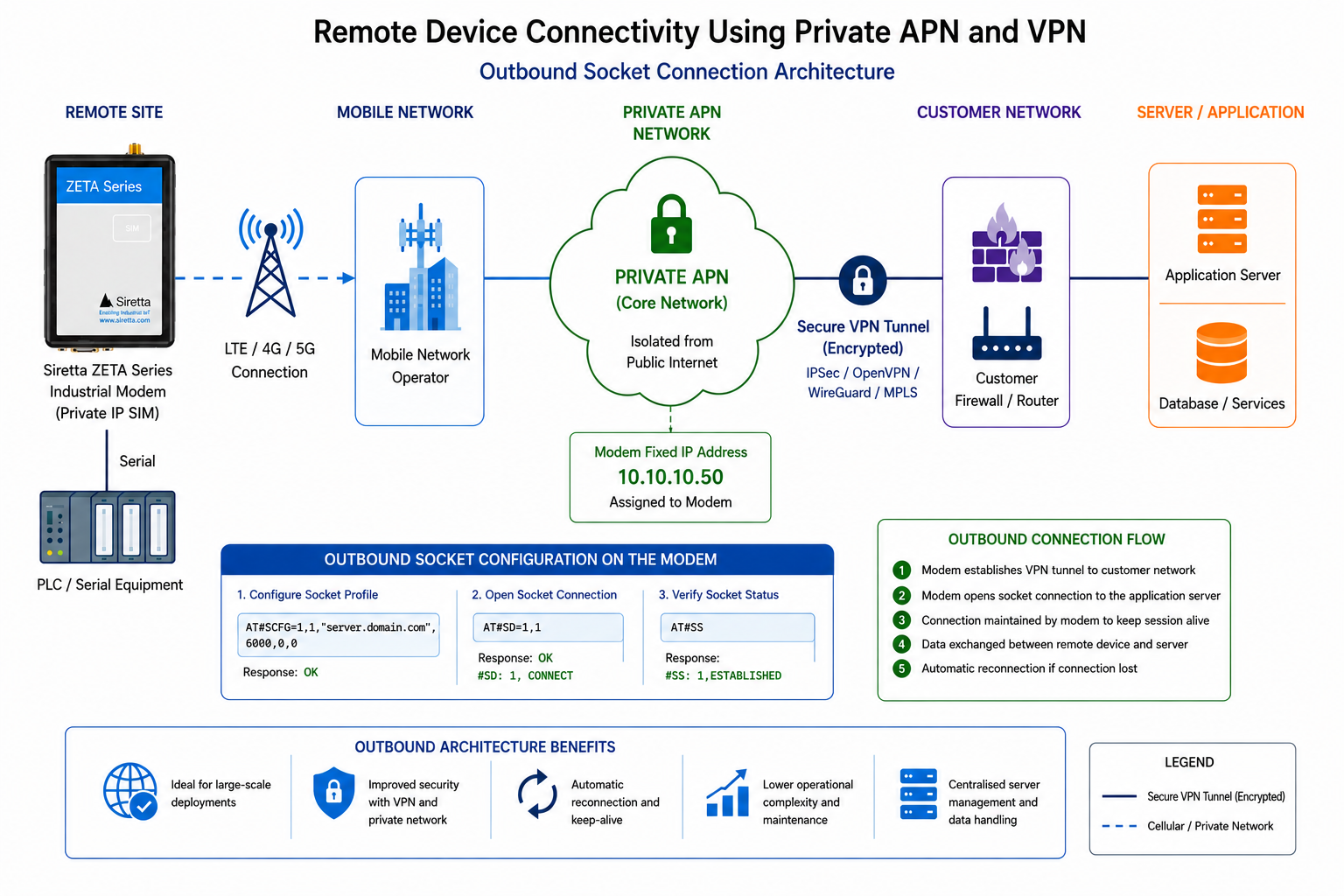
¶ Outbound Socket Architecture
While inbound socket access provides direct communication with a remote modem, many deployments instead use an outbound socket architecture.
In this model, the modem initiates the connection to a central server.
The server then communicates with the modem across the established connection.
This architecture is commonly used for:
- Large telemetry deployments
- IoT platforms
- Cloud applications
- Asset tracking
- Smart metering
- Environmental monitoring
- Distributed industrial systems
¶ Why Use an Outbound Connection?
Many organisations prefer outbound connections because they eliminate the need for direct inbound access to field devices.
Rather than connecting to hundreds or thousands of individual devices, the application communicates with a single central server.
¶ Figure 7 – Outbound Socket Architecture
Remote Device
       │
Private APN
       │
VPN Tunnel
       │
Central Server
       │
Client Application
In this arrangement:
- The modem initiates the connection
- The server accepts the connection
- The application communicates via the server
- Devices remain hidden from end users
¶ Understanding the Connection Flow
The communication sequence is typically:
Modem Powers Up
        │
Activates PDP Context
        │
Obtains Fixed IP Address
        │
Connects To Server
        │
Maintains TCP Session
        │
Exchanges Data
¶ Figure 8 – Outbound Connection Sequence
¶ Preparing the Server
Before configuring the modem, a server must be available.
The server may be:
- SCADA Server
- Industrial Gateway
- Linux Server
- Windows Server
- IoT Platform
- Custom Application
The server must:
- Be reachable across the VPN
- Listen on a known IP address
- Listen on a known TCP port
Example:
Server IP:
10.10.1.100

Port:
5000
¶ Configure Socket Parameters
Configure the socket profile.
Example:
AT#SCFG=1,1,300,90,600,50
Example response:
OK
¶ Open an Outbound Socket
The modem can now initiate a connection.
Example:
AT#SD=1,0,5000,"10.10.1.100",0,0,1
Where:
| Parameter | Description |
|---|---|
| 1 | Socket Identifier |
| 0 | TCP Mode |
| 5000 | Remote Port |
| 10.10.1.100 | Server IP Address |
| 0 | Connection Options |
| 0 | Reserved |
| 1 | Command Mode |
Example response:
CONNECT
This indicates the TCP connection has been successfully established.
¶ Using a Hostname Instead of an IP Address
Where DNS services are available, the server may be referenced using a hostname.
Example:
AT#SD=1,0,5000,"server.company.local",0,0,1
This can simplify server management when addresses change.
¶ Verify Socket Status
Check socket state:
AT#SS
Example response:
#SS: 1,CONNECTED
This confirms:
- TCP session established
- Data path active
- Server reachable
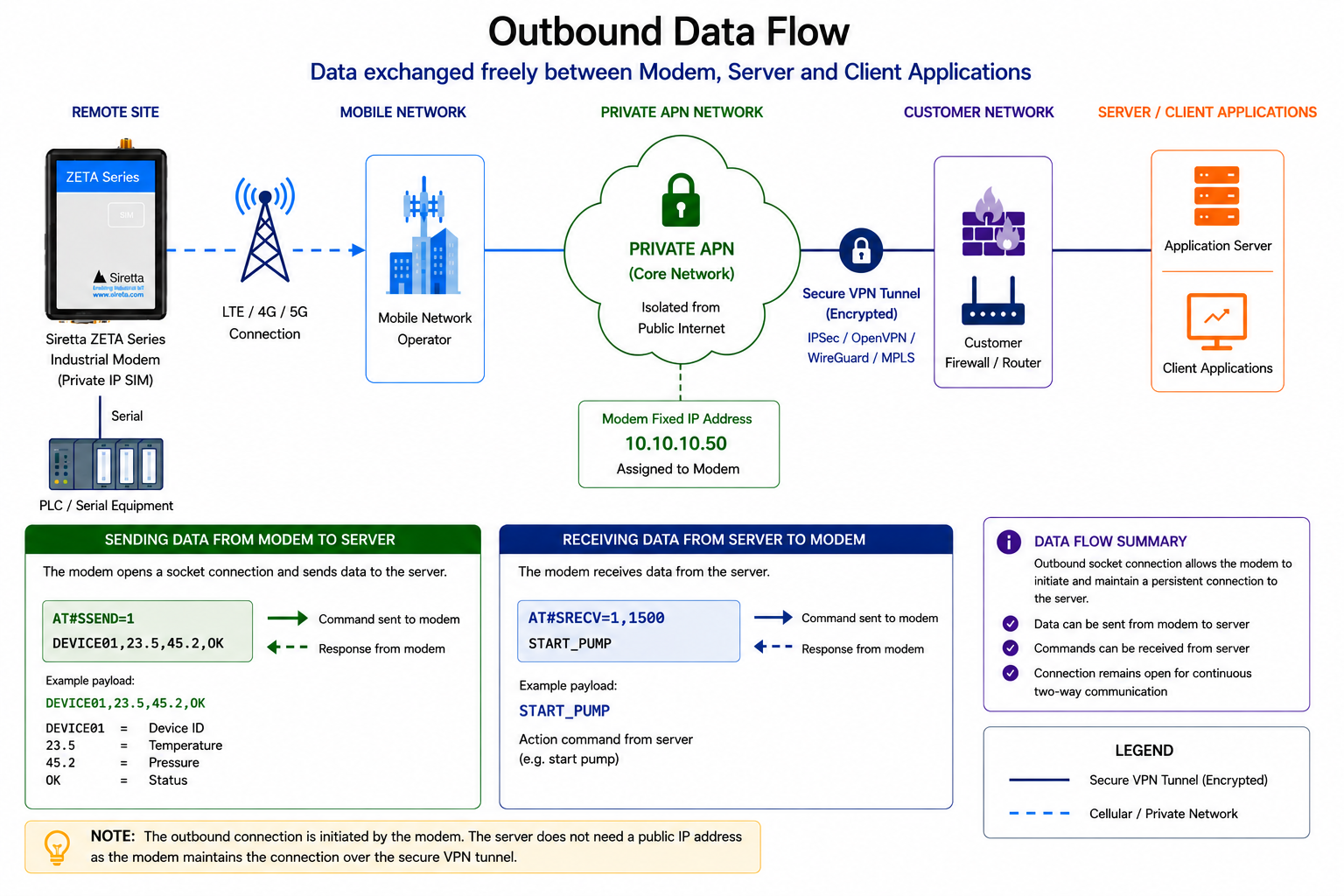
¶ Data Transmission
Once connected, data can be exchanged freely between:
- Modem
- Server
- Client Applications
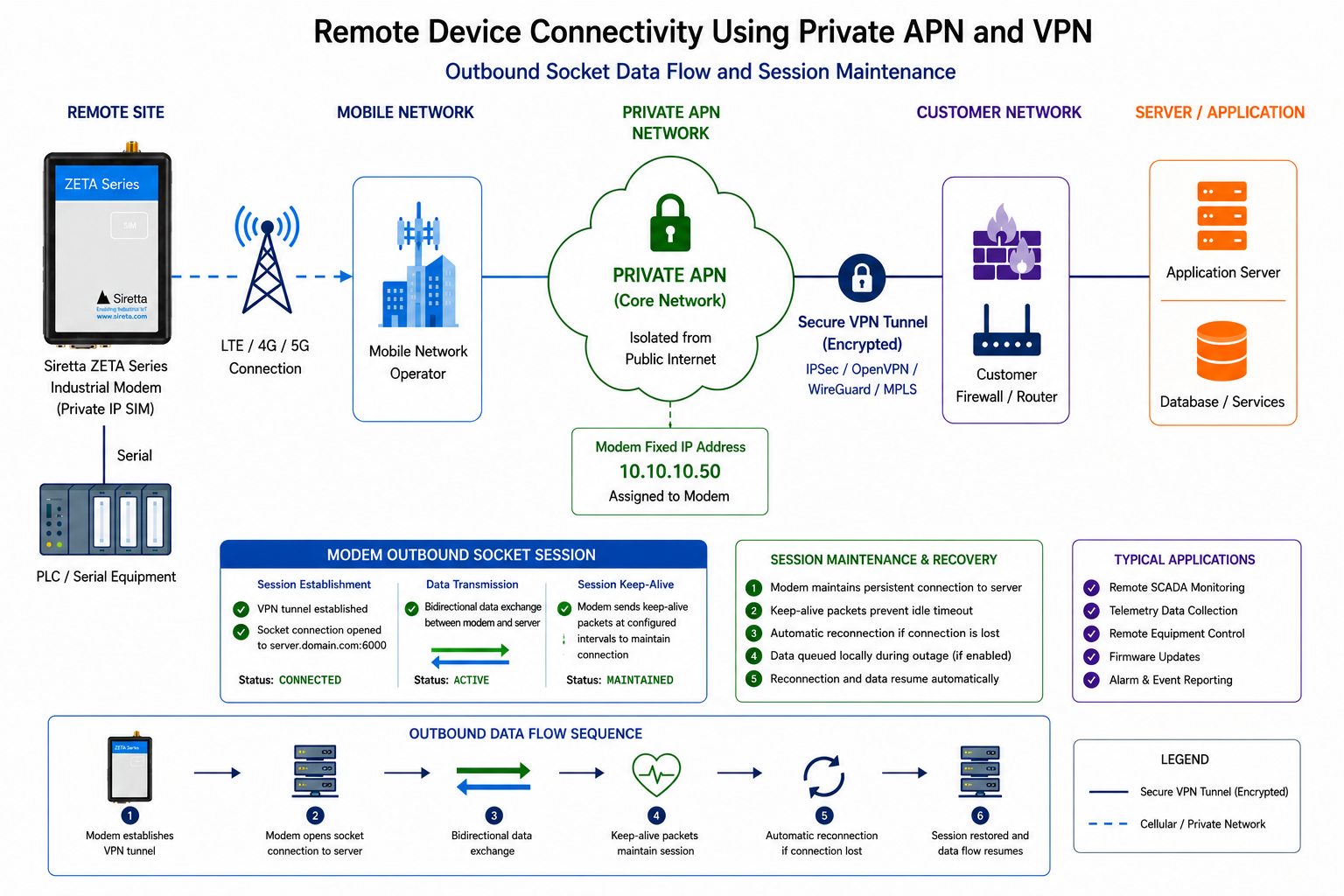
¶ Figure 9 – Outbound Data Flow
¶ Sending Data to the Server
Transmit data:
AT#SSEND=1
Example response:
>
Send payload:
DEVICE01,23.5,45.2,OK
Terminate using:
CTRL+Z
Example response:
OK
The server receives:
DEVICE01,23.5,45.2,OK
¶ Receiving Commands from the Server
Read received data:
AT#SRECV=1,1500
Example response:
#SRECV: 12

START_PUMP
The modem can then pass this command to connected equipment.
¶ Persistent Connections
Many industrial systems maintain a permanent TCP connection.
Advantages include:
- Immediate communication
- Lower latency
- Reduced session establishment overhead
- Simplified device management
Typical workflow:
Power On
   │
Connect Server
   │
Remain Connected
   │
Transmit Events
   │
Receive Commands
¶ Reconnection Strategy
Mobile networks occasionally experience:
- Coverage loss
- Network maintenance
- PDP session drops
- Signal degradation
The application should therefore implement automatic reconnection logic.
Typical strategy:
Socket Disconnect
        │
Wait 30 Seconds
        │
Reopen Socket
        │
Verify Connection
        │
Resume Operation
¶ Event-Driven Communications
Many modern systems use event-driven messaging.
Rather than polling continuously, the modem only sends information when something changes.
Examples:
Temperature Alarm
Door Open
Power Failure
Pump Started
Pump Stopped
Low Battery
Advantages:
- Lower data usage
- Reduced network load
- Faster alarm notification
¶ Polling-Based Communications
Traditional SCADA systems frequently use polling.
Example:
SCADA Server
       │
Poll Every 60 Seconds
       │
Remote Device
The server periodically requests data.
Example:
GET_STATUS
The modem responds:
LEVEL=73%
PRESSURE=2.5BAR
TEMP=21C
¶ Centralised Server Architecture
One major advantage of outbound connectivity is scalability.
¶ Figure 10 – Multi-Device Configuration
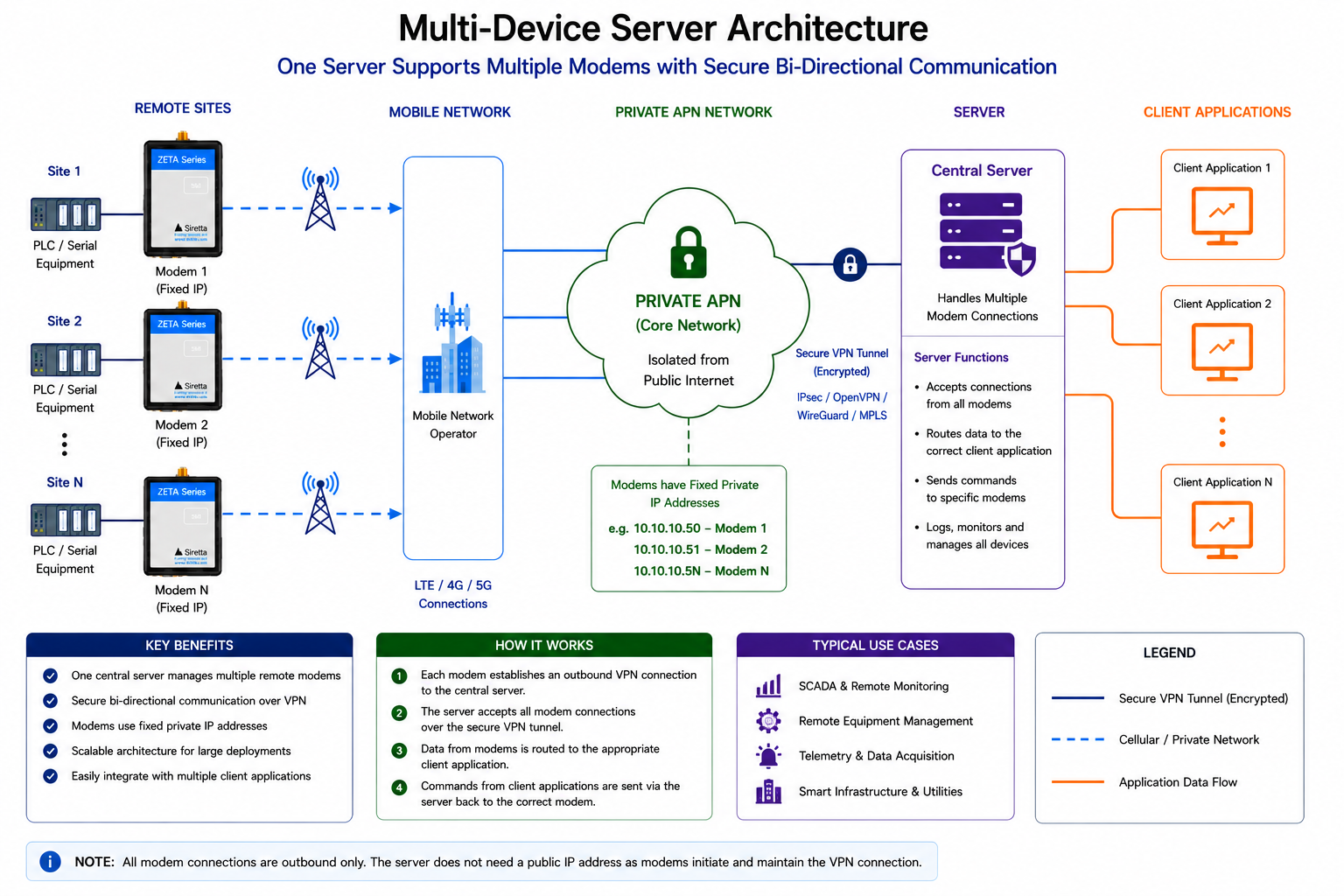
Device 1
Device 2
Device 3
Device 4
     │
Private APN
     │
VPN Tunnel
     │
Central Server
     │
Applications
The application only communicates with the server.
The server manages all connected devices.
¶ Advantages of Outbound Socket Access
| Benefit | Description |
|---|---|
| Scalable | Supports large numbers of devices |
| Centralised Management | Single communication endpoint |
| Simplified Security | No direct access to field devices required |
| Lower Administration | No individual device routing required |
| Cloud Friendly | Integrates well with modern applications |
¶ Limitations of Outbound Socket Access
| Consideration | Description |
|---|---|
| Server Required | Requires a central endpoint |
| Additional Infrastructure | Server must be maintained |
| Connection Management | Application must handle reconnections |
| Single Point of Failure | Server outage impacts communications |
¶ Inbound vs Outbound Comparison
| Feature | Inbound Socket | Outbound Socket |
|---|---|---|
| Direct Device Access | Yes | No |
| Server Required | No | Yes |
| Suitable for SCADA | Excellent | Good |
| Large Deployments | Moderate | Excellent |
| Device Visibility | Direct | Hidden Behind Server |
| Scalability | Moderate | High |
Expected Result
The modem should now be capable of establishing an outbound socket connection to a VPN-connected server and exchanging data securely across the private APN infrastructure.
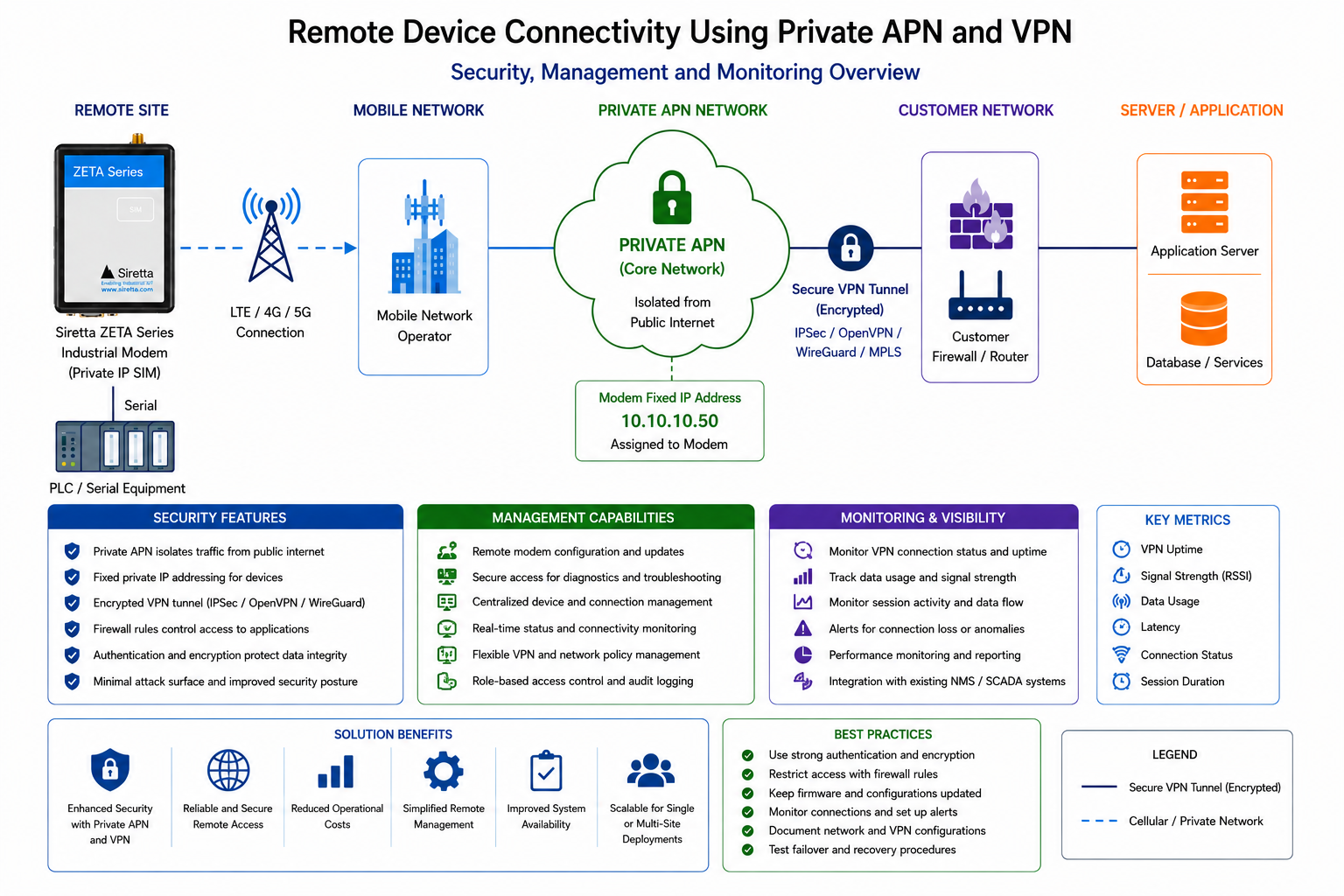
¶ Security Considerations
Private APN connectivity provides significant security advantages compared to traditional public internet deployments.
However, it is important to understand the difference between:
- Traffic isolation
- Traffic encryption
These are often confused but provide different security functions.
¶ Understanding Private APN Security
A private APN prevents devices from being directly exposed to the public internet.
Instead of routing traffic via the internet, the mobile operator routes traffic into a dedicated private network.
¶ Figure 11 – Private APN Traffic Isolation
[FIGURE 11 HERE]
Private APN Traffic Isolation
Remote Device
      │
Private APN
      │
Provider Core Network
      │
Customer Network
This provides:
- Network segregation
- Controlled access
- Reduced attack surface
- Simplified routing
However, it does not automatically provide end-to-end encryption.
¶ Understanding VPN Security
A VPN provides an encrypted tunnel between:
Customer Network
        │
Encrypted VPN Tunnel
        │
Private APN Network
¶ Figure 12 – VPN Encrypted Connectivity
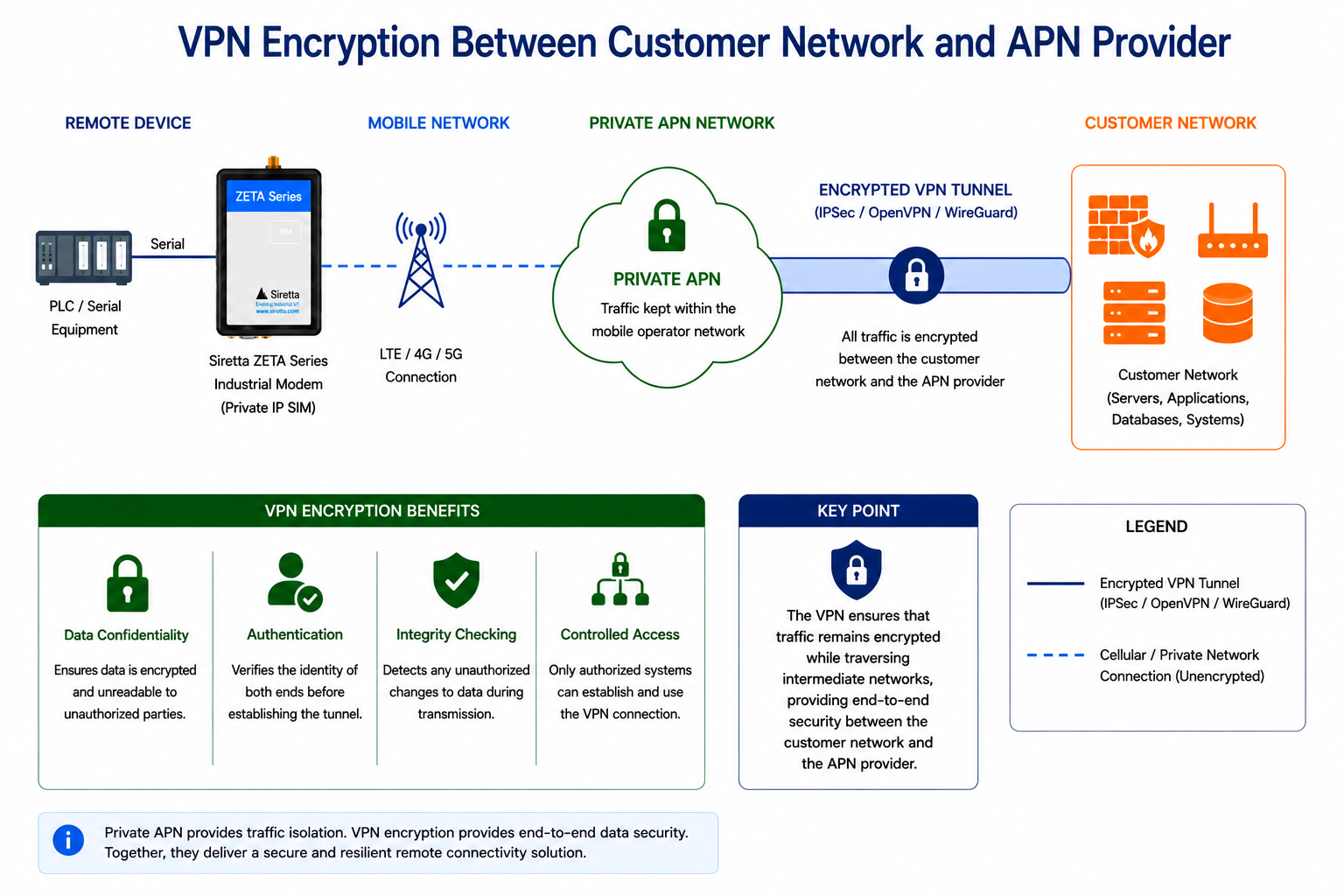
Benefits include:
- Data confidentiality
- Authentication
- Integrity checking
- Controlled access
The VPN ensures that traffic remains encrypted while traversing intermediate networks.
¶ Common Misconceptions
¶ Misconception 1
¶ "A Private APN Is Automatically Encrypted"
This is not necessarily true.
A private APN provides:
- Routing separation
- Traffic isolation
It does not inherently provide:
- Encryption
- Authentication
- Data confidentiality
These functions are normally provided by a VPN or application-layer encryption.
¶ Misconception 2
¶ "A Fixed IP SIM Is Publicly Accessible"
A fixed IP address does not automatically imply public accessibility.
Many fixed IP SIMs are allocated addresses within private network ranges such as:
10.x.x.x
172.16.x.x – 172.31.x.x
192.168.x.x
These addresses are not routable on the public internet.
Access is normally possible only via:
- VPN
- MPLS
- Private network interconnect
¶ Misconception 3
¶ "A VPN Eliminates The Need For Firewalls"
A VPN provides secure transport.
It should not replace:
- Firewall controls
- Access control policies
- Authentication mechanisms
Best practice is to use both VPN protection and firewall restrictions.
¶ Recommended Security Architecture
For most industrial deployments Siretta recommends the following approach.
¶ Figure 13 – Private APN + VPN + Firewall Architecture
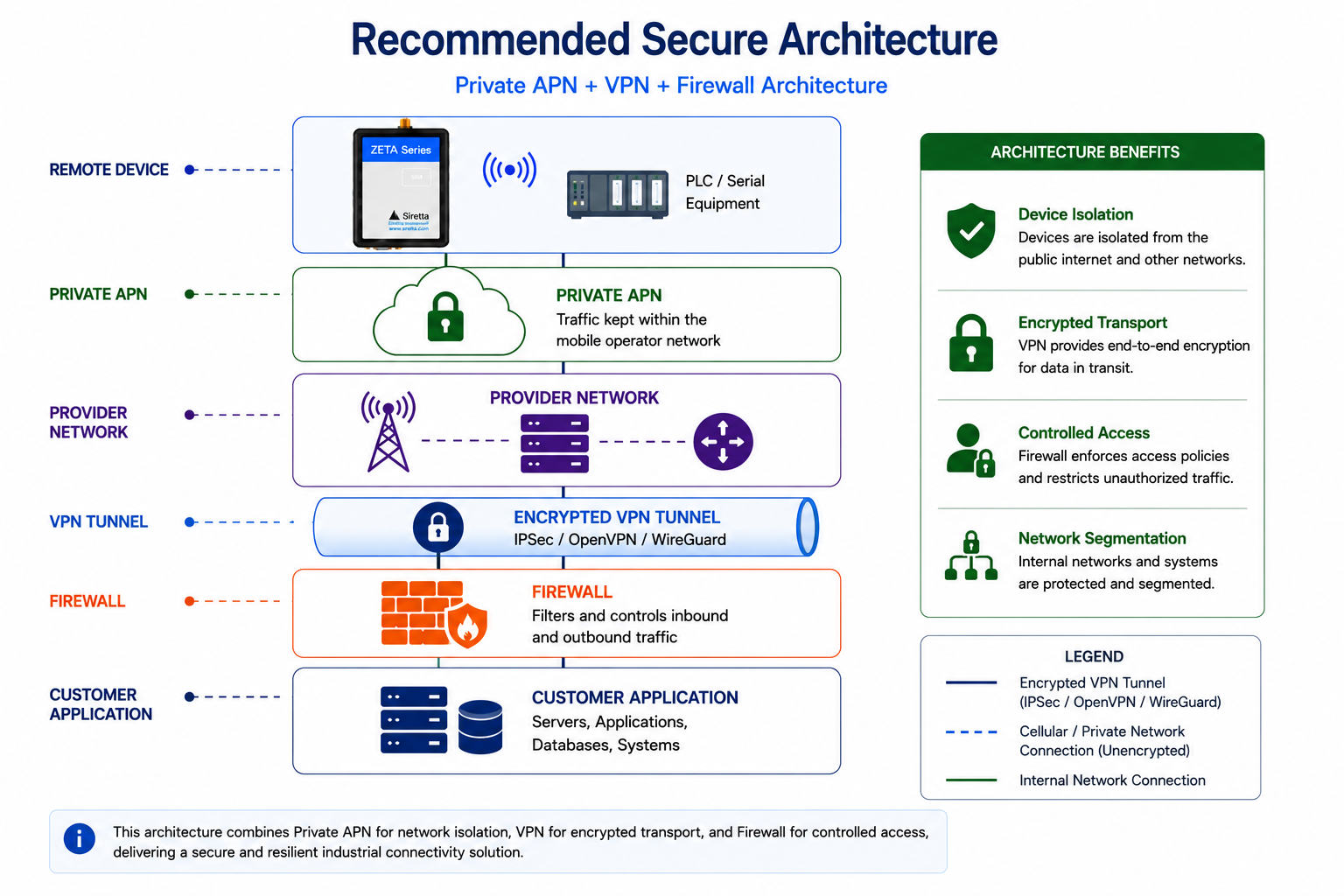
Remote Device
      │
Private APN
      │
Provider Network
      │
VPN Tunnel
      │
Firewall
      │
Customer Application
This architecture provides:
- Device isolation
- Encrypted transport
- Controlled access
- Network segmentation
¶ Security Best Practices
¶ Restrict Firewall Rules
Permit only known systems to access the modem.
Example:
AT#FRWL=1,"10.10.1.100","255.255.255.255"
rather than:
AT#FRWL=1,"0.0.0.0","0.0.0.0"
¶ Use Strong VPN Authentication
VPN endpoints should use:
- Strong passwords
- Certificates
- Multi-factor authentication where possible
¶ Monitor Connectivity
Monitor:
- VPN status
- Packet data sessions
- Socket status
- Device connectivity
This allows communication failures to be identified quickly.
¶ Maintain Firmware
Keep modem firmware updated to ensure:
- Security updates
- Bug fixes
- Protocol improvements
are applied.
¶ Troubleshooting
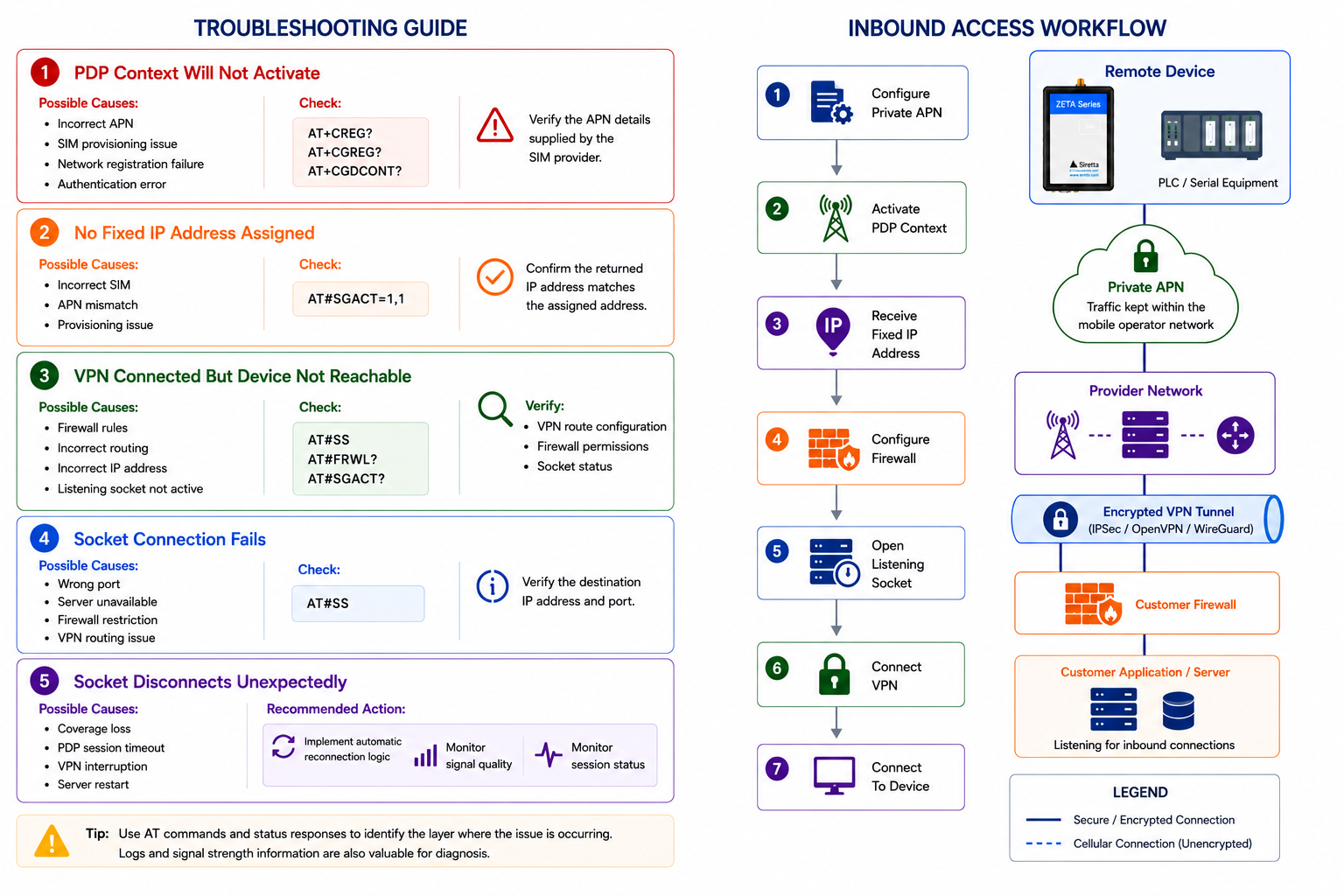
¶ PDP Context Will Not Activate
Possible causes:
- Incorrect APN
- SIM provisioning issue
- Network registration failure
- Authentication error
Check:
AT+CREG?
AT+CGREG?
AT+CGDCONT?
Verify the APN details supplied by the SIM provider.
¶ No Fixed IP Address Assigned
Possible causes:
- Incorrect SIM
- APN mismatch
- Provisioning issue
Check:
AT#SGACT=1,1
Confirm the returned IP address matches the assigned address.
¶ VPN Connected But Device Not Reachable
Possible causes:
- Firewall rules
- Incorrect routing
- Incorrect IP address
- Listening socket not active
Check:
AT#SS
AT#FRWL?
AT#SGACT?
Verify:
- VPN route configuration
- Firewall permissions
- Socket status
¶ Socket Connection Fails
Possible causes:
- Wrong port
- Server unavailable
- Firewall restriction
- VPN routing issue
Check:
AT#SS
and verify the destination IP address and port.
¶ Socket Disconnects Unexpectedly
Possible causes:
- Coverage loss
- PDP session timeout
- VPN interruption
- Server restart
Recommended action:
- Implement automatic reconnection logic
- Monitor signal quality
- Monitor session status
¶ Process Summary
¶ Inbound Socket Access
Configure Private APN
          │
Activate PDP Context
          │
Receive Fixed IP Address
          │
Configure Firewall
          │
Open Listening Socket
          │
Connect VPN
          │
Connect To Device
¶ Figure 14 – Inbound Access Workflow
¶ Outbound Socket Access
Configure Private APN
          │
Activate PDP Context
          │
Receive Fixed IP Address
          │
Connect To Server
          │
Maintain Socket
          │
Exchange Data
¶ Figure 15 – Outbound Access Workflow
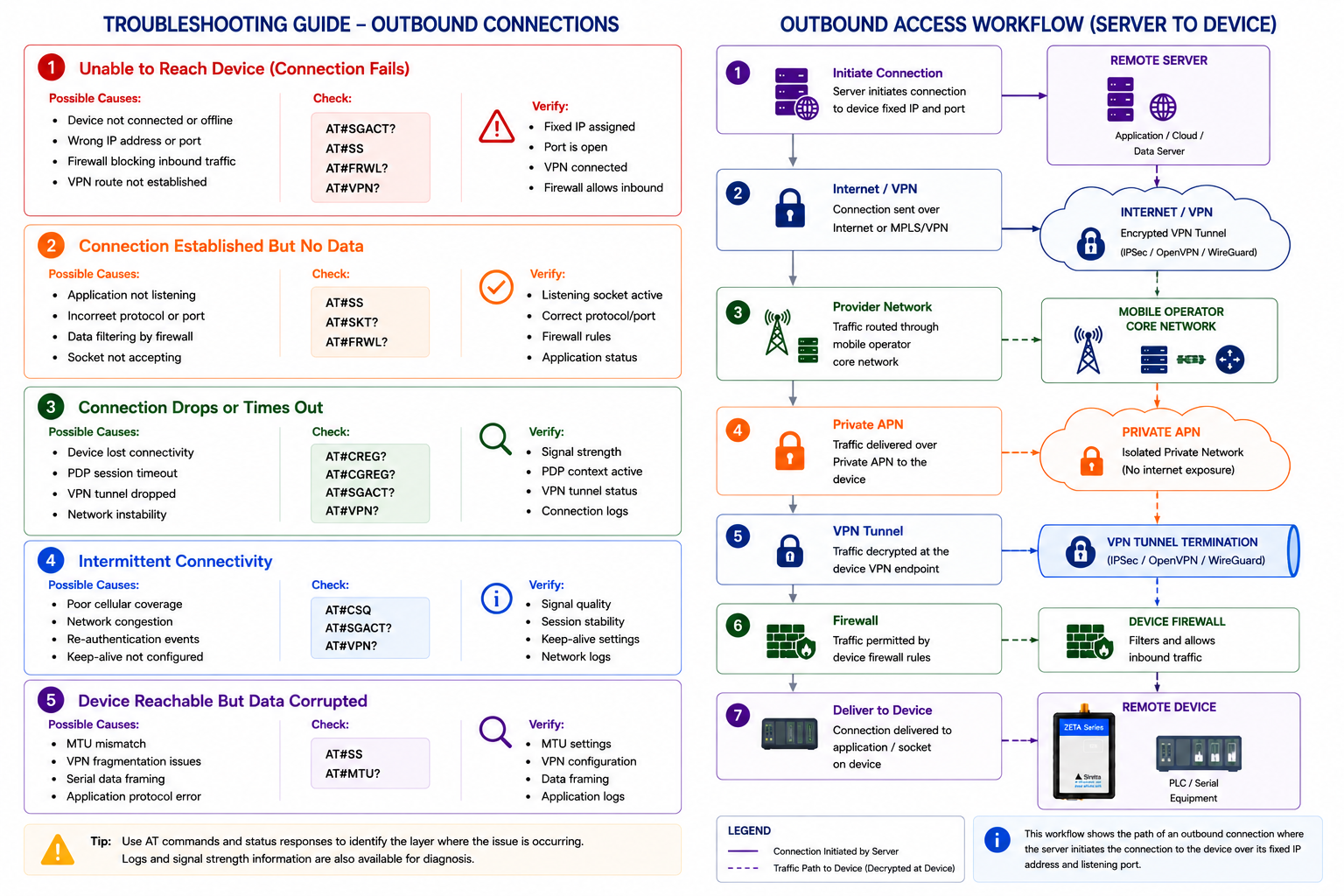
¶ Choosing the Correct Solution
| Requirement | Recommended Architecture |
|---|---|
| Direct PLC Access | Inbound Socket |
| Direct SCADA Polling | Inbound Socket |
| Remote Engineering Access | Inbound Socket |
| Large Device Fleets | Outbound Socket |
| Cloud Integration | Outbound Socket |
| Central Data Aggregation | Outbound Socket |
¶ Understanding Cellular Network Security
Cellular communication is inherently more secure than many traditional IP networking technologies because every device must authenticate with the mobile network before a data session can be established.
Unlike Ethernet or Wi-Fi networks, a cellular modem cannot simply transmit data after being connected. The SIM card must first authenticate with the mobile operator, which verifies the subscriber's identity and establishes a secure radio session before allowing any traffic onto the network.
Modern LTE and 5G networks include multiple built-in security mechanisms that protect communications between the modem and the mobile operator.
These include:
- SIM authentication
- Mutual authentication between the SIM and the mobile network
- Air interface encryption
- Temporary subscriber identities
- Network-controlled session management
- Subscriber authorisation
These mechanisms help prevent unauthorised devices from accessing the cellular network and protect wireless communications from interception.
Important Note
Cellular network security protects communications between the modem and the mobile operator. Once traffic leaves the operator's core network, additional protection such as a VPN should be used whenever end-to-end encryption is required.
¶ Cellular Security Layers
The diagram below illustrates the security mechanisms that exist before any VPN tunnel is established.
¶ Figure 16 – Cellular Network Security Layers
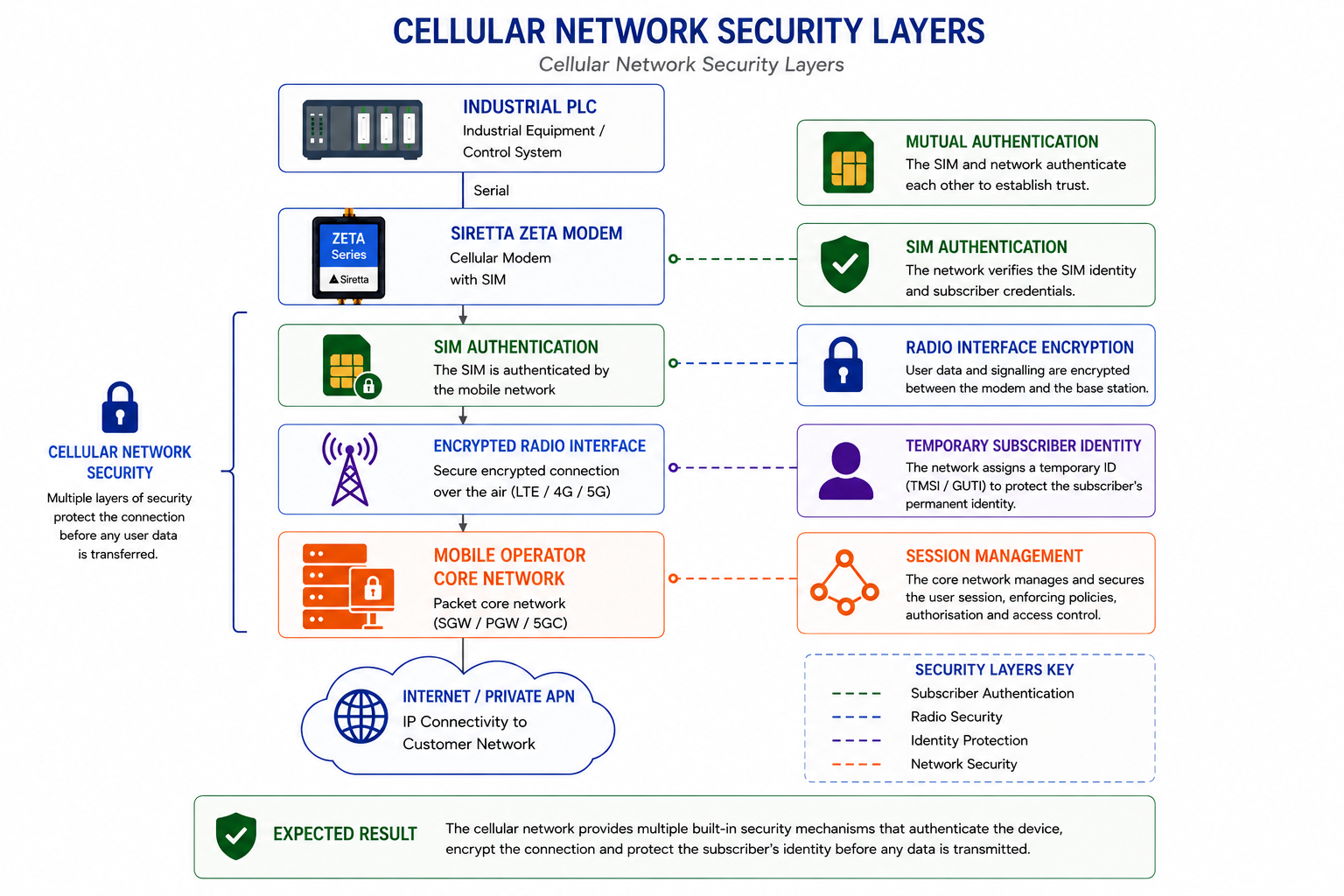
Industrial PLC
        │
Siretta ZETA Modem
        │
SIM Authentication
        │
Encrypted Radio Interface
        │
Mobile Base Station
        │
Mobile Operator Core Network
The diagram should highlight:
- SIM Authentication
- Mutual Authentication
- Air Interface Encryption
- Temporary Subscriber Identity (TMSI/GUTI)
- Session Management
- Secure Mobile Core Network
Expected Result
The reader should understand that the mobile network already provides multiple layers of security before VPN encryption is introduced.
¶ End-to-End VPN Encryption from the Remote Equipment
Many industrial control systems establish the VPN tunnel directly from the PLC or industrial controller rather than from the cellular modem.
In this architecture the Siretta modem simply provides IP connectivity between the industrial controller and the cellular network. The encrypted VPN tunnel originates within the PLC, passes transparently through the modem and mobile network, and terminates at the customer's VPN gateway.
Because the VPN originates within the industrial controller, the application data remains encrypted for its entire journey across the cellular network, the private APN and the operator's core network.
The modem never decrypts, inspects or terminates the VPN traffic.
This architecture is commonly implemented using:
- Siemens PLCs
- Beckhoff Industrial PCs
- WAGO Controllers
- Phoenix Contact PLCs
- Schneider Electric PLCs
- Linux-based Industrial Gateways
- Embedded Industrial Computers
¶ Advantages of Remote Node-Based VPN Encryption
Implementing the VPN within the PLC or industrial controller provides several advantages:
- True end-to-end encryption
- VPN independent of the cellular modem
- Compatible with virtually any IP modem
- VPN credentials remain securely within the PLC
- Direct integration with industrial control software
- Simplified modem configuration
- Secure communication across both public and private cellular networks
Important Note
The Siretta modem acts purely as an IP transport device. It forwards encrypted IP packets but does not decrypt, inspect or terminate the VPN tunnel.
¶ Remote Node-Based End-to-End VPN Architecture
The following example illustrates a PLC establishing the VPN tunnel while the Siretta modem simply transports encrypted IP packets across the cellular network.
¶ Figure 17 – IP Transport Only
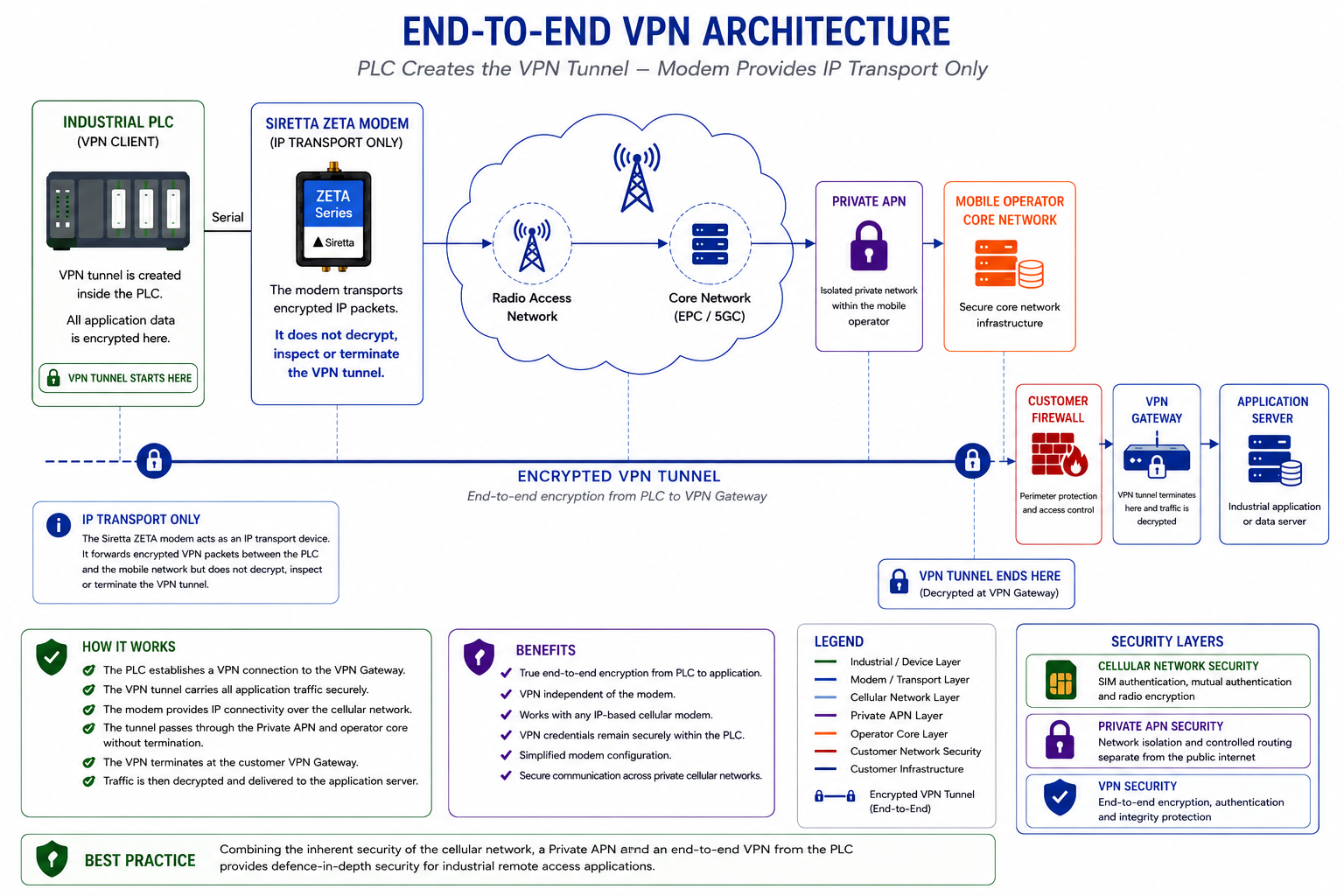
Industrial PLC
(VPN Client)
        │
Serial
        │
Siretta ZETA Modem
(IP Transport Only)
        │
LTE / 4G / 5G Network
        │
Private APN
        │
Mobile Operator Core Network
══════════════════════════════════════
      Encrypted VPN Tunnel
══════════════════════════════════════
        │
Customer Firewall
        │
VPN Gateway
        │
Application Server
The VPN tunnel should begin at the PLC and terminate at the customer VPN gateway, passing transparently through:
- The Siretta modem
- The LTE / 4G / 5G cellular network
- The Private APN
- The Mobile Operator Core Network
without terminating at any of these intermediate devices.
The modem should include a callout stating:
IP Transport Only
The modem forwards encrypted VPN packets and does not decrypt, inspect or terminate the VPN tunnel.
¶ Layered Security Model
When combined, the cellular network, Private APN and VPN each provide different but complementary layers of protection.
| Security Layer | Protection Provided |
|---|---|
| Cellular Network | SIM authentication, mutual authentication and encrypted radio communications |
| Private APN | Network isolation, controlled routing and removal from the public Internet |
| VPN | End-to-end encryption, authentication, integrity checking and secure application transport |
Together these technologies create a defence-in-depth architecture suitable for secure industrial IoT deployments.
Best Practice
Siretta recommends combining the inherent security of the cellular network with a Private APN and an end-to-end VPN established by the PLC or industrial controller. This architecture provides network isolation, encrypted communications and controlled access while keeping the modem configuration simple and application independent.
¶ Recommended Workflow
For most industrial deployments:
- Obtain a private fixed IP SIM.
- Configure the private APN.
- Establish VPN connectivity to the provider network.
- Verify fixed IP assignment.
- Apply firewall restrictions.
- Select either inbound or outbound socket architecture.
- Verify end-to-end communications.
- Implement monitoring and reconnection logic.
Expected Result
A secure communication path should now exist between the remote cellular modem, the private APN infrastructure, the VPN-connected network and the end application.
Reference Centre
Return to the Industrial Modem Application Notes